
Data Sharing
on 01-27-2026 12:00 AM by SnapApp by BlueVector AI
1348
Introduction
Data sharing in SnapApp defines who can see, create, edit, or delete data within the application. A well-designed data sharing model ensures that users can access the information they need and nothing more.
This document explains the core concepts of the SnapApp data sharing model in simple terms. It is intended for beginners and covers:
- How access to data is controlled
- The key components of the data sharing model
- How these components work together to keep data secure
Table of Contents
- Why Data Sharing Matters
- Understanding Record-Level Security
- How Access Starts in SnapApp
- Core Components of the SnapApp Data Sharing Model
- 1. Roles and Permission Sets
- What is a Role?
- What is a Permission Set?
- What Roles and Permission Sets Control
- 2. Users, Record Ownership, and Queues
- Record Ownership
- Hierarchical Access
- Queues
- 3. Data Access Role Hierarchy
- Key Points
- Designing the Hierarchy
- 4. Sharing Rules
Why Data Sharing Matters
Every user, service, or application should have only the minimum permissions required to perform its task. This principle improves:
- Security
- Data privacy
- System stability
By limiting access, SnapApp helps prevent accidental data changes and unauthorized access.
Understanding Record-Level Security
Record-level security controls access to individual records (rows of data). This allows some users to see or edit specific records while restricting others.
How Access Starts in SnapApp
- A user logs in (authentication)
- SnapApp identifies who the user is
- Permissions are applied based on roles, ownership, and sharing rules
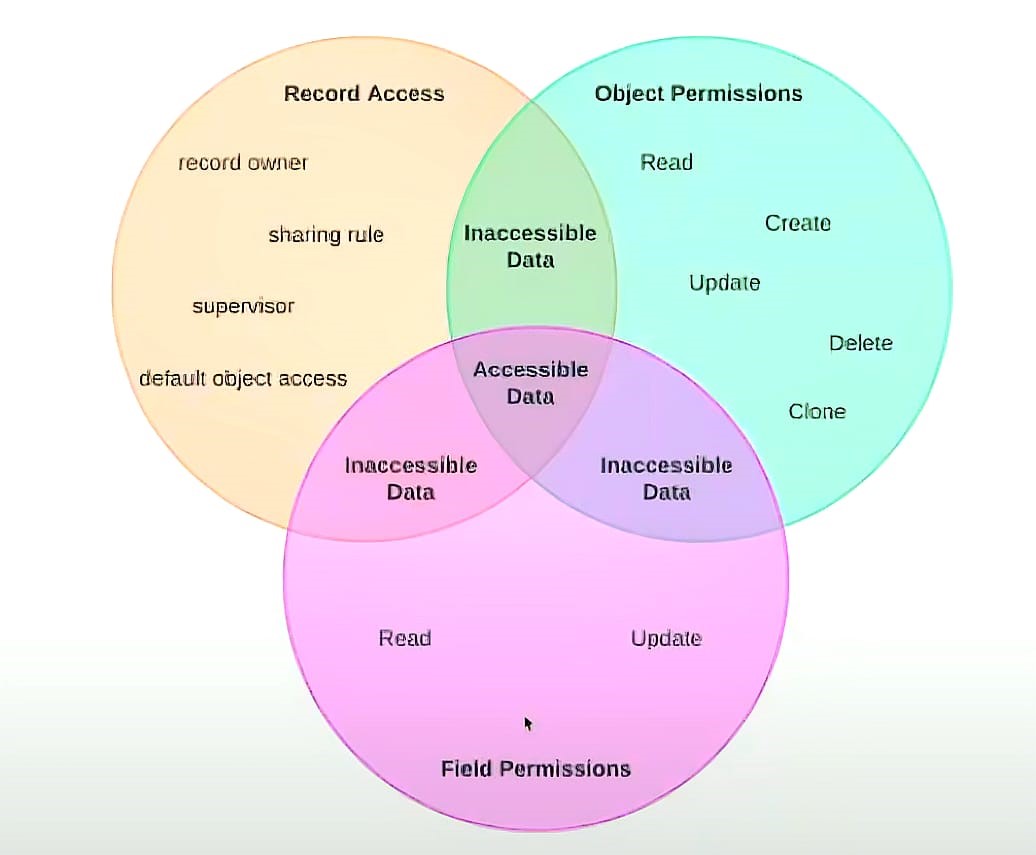
Note: When a user tries to open or modify data, SnapApp checks access in three layers:
- Object-level access – Determines whether the user can access a Object (Relation / Table) at all. If not allowed, the user cannot see or interact with any records in that table.
- Field-level access – Controls which fields (columns / attributes) within a record the user can view or edit. Sensitive fields can be hidden or made read-only.
- Record-level access – Decides which specific records (rows) the user can view or modify based on ownership, role hierarchy, and sharing rules. Together, these layers provide strong and flexible data protection.

Core Components of the SnapApp Data Sharing Model
SnapApp uses several components that work together to control data access.
1. Roles and Permission Sets
What is a Role?
A Role is a high-level security definition assigned to users. It represents what a user is allowed to do in the system.
Each role contains one or more permission sets.
What is a Permission Set?
A Permission Set defines access to:
- Applications
- Objects (tables)
- Fields within those objects
Permission sets can be reused across multiple roles, making access management flexible and consistent.
What Roles and Permission Sets Control
They provide table-level security, defining whether a user can:
- View records
- Create new records
- Edit existing records
- Delete records
Some special permissions, such as View All and Modify All, allow users (usually administrators) to access all records in a table, regardless of sharing rules.
For more details, visit here.
2. Users, Record Ownership, and Queues
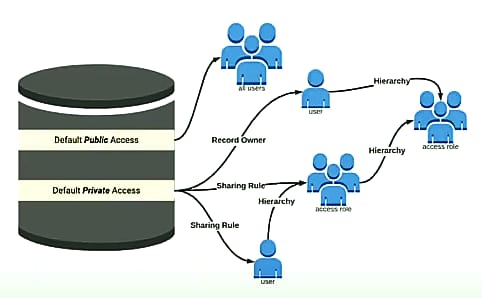
Record Ownership
Every record in SnapApp must be owned by:
- A single user, or
- A queue
The record owner’s access depends on the permissions granted by their role.
Example: If a user has permission to Create and Read records but not Edit or Delete, they can create and view records, but cannot modify or remove them.
For more details, visit here.

Hierarchical Access
Users higher in the data access hierarchy (such as managers) automatically inherit access to records owned by their subordinates. This applies to:
- Records owned by users
- Records shared with those users
For more details, visit here.
Queues
Queues are used when records need to be shared among teams rather than owned by a single user.
Queues help with:
- Workload distribution
- Task prioritization
- Team-based ownership
Queue members and users higher in the role hierarchy can:
- View records in the queue
- Take ownership of records when needed
For more details, visit here.
3. Data Access Role Hierarchy
A data access role hierarchy defines how data visibility flows within an organization.
Key Points
- Managers can access data owned by their team
- The hierarchy does not need to match the HR reporting structure
- Roles should be designed based on data access needs, not job titles
- Users in the same role do not automatically see each other’s data
When a user’s role changes, SnapApp automatically reevaluates sharing rules to update their access.
Designing the Hierarchy
Most organizations start at the top (for example, a CEO or admin role) and move downward into departments, regions, or teams. The goal is clarity and controlled access, not organizational reporting.
4. Sharing Rules
Sharing rules allow administrators to extend record access beyond ownership and hierarchy.
They define:
- Which users or roles get access
- Which records are shared
- What level of access is granted (read, edit, create, delete)
Sharing rules are useful when:
- Teams need shared visibility
- Cross-department collaboration is required
- Ownership should not be changed
For more details, visit here.
Thank you for following these steps to configure your SnapApp components effectively.If you have any questions or need further assistance, please don’t hesitate to reach out to our support team. We’re here to help you make the most out of your SnapApp experience.
For support, email us at snapapp@bluevector.ai


