
SnapApp Field Types - Video
on 01-16-2026 12:00 AM by SnapApp by BlueVector AI
438
Video Field
The Video field type allows for the upload, embedding, or generation of video content directly within a record. It provides a native player interface, allowing users to view multimedia content without leaving the application.
Video Field Properties
Basic Properties
The Basic Properties tab establishes the field’s identity and its relationship to the parent object.
| Property | Description |
|---|---|
| Data Type | Set to Video. This enables the multimedia player and upload UI. |
| Object | The parent object this field belongs to. |
| Label | The user-facing name, such as “Training Video” or “Inspection Clip”. |
| Column Name | Prepopulated from the Label (e.g., site_inspection_video). |
| Description | Internal notes explaining the source or requirement for the video content. |
Data Type Properties
When the Video data type is selected, the following configuration is available to define file compatibility:
- File Input Type: A dropdown menu to restrict the allowed video formats. Options include:
- mp4
- webm
- ogg
- avi
- mov
- All File Types

Display Properties
These settings control the visual presentation and automated logic of the video player.
General Display Settings
| Property | Description |
|---|---|
| Placeholder | Instructional text shown when the field is empty. |
| Help Text | Guidance shown when a user hovers over the video icon. |
| Field Width | Defines horizontal span; typically set to 100% to accommodate the player. |
| Sequence | Sets the vertical order of the field in forms (e.g., 10, 20, 30). |
Logic & Automation
| Property | Description |
|---|---|
| Initial Value | A default video file path or URL set upon creation. |
| Formula | Automatically calculates a video source based on other fields. |
| Copy To Clipboard | Adds an icon allowing users to quickly copy the video link or filename. |

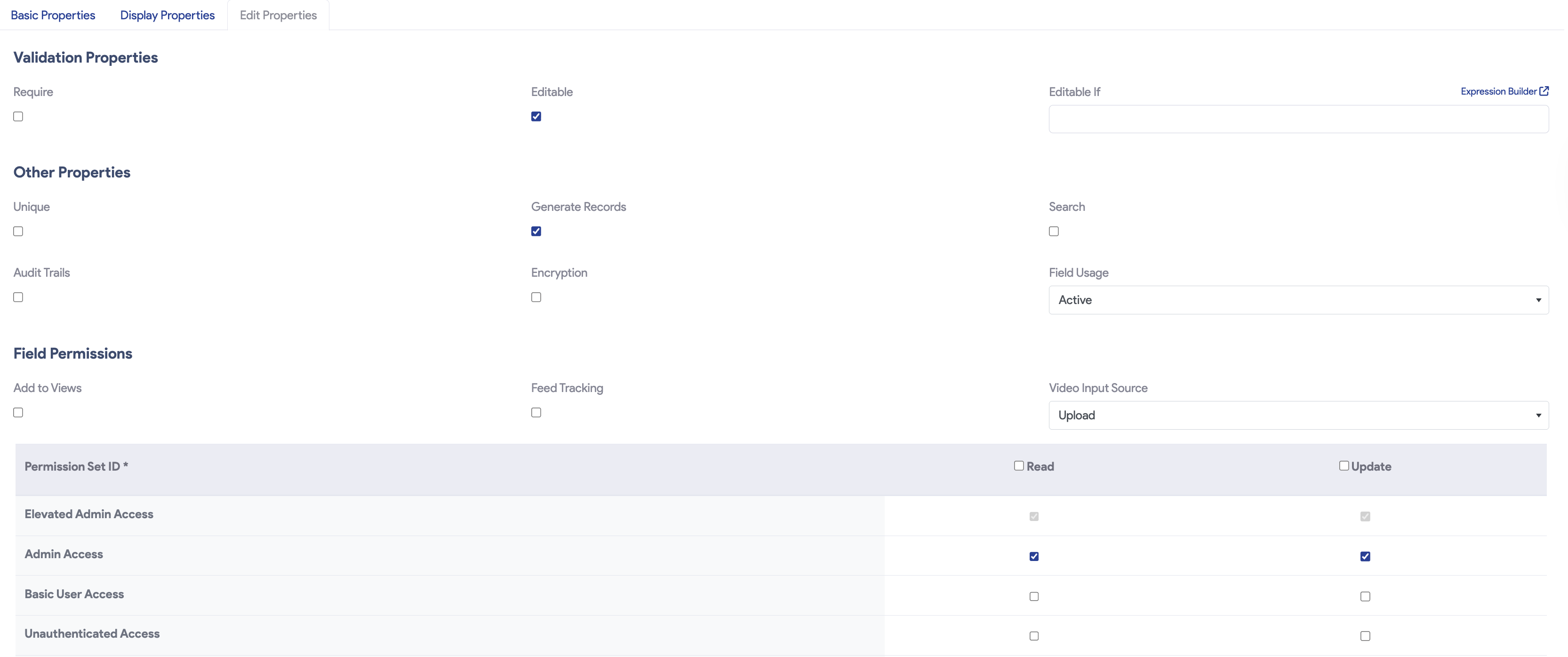
Edit Properties
These properties define the security, lifecycle, and source permissions for video data.
Validation & Other Properties
| Property | Description |
|---|---|
| Require | Makes video content mandatory to save the record. |
| Search | Indices the video metadata for the global search bar. |
| Audit Trails | Tracks the history of video uploads and changes. |
| Encryption | Secures the video file at rest in the database. |
| Field Usage | A dropdown to manage the lifecycle: Active, Inactive, DeprecateCandidate, or None. |
Field Permissions
This section controls where the video content can originate from:
- Video Input Source: A dropdown defining how users can add video. Options include:
- None: Disables input.
- Generate: Uses AI or system tools to create video content.
- All: Allows all available input methods.
- Upload: Allows users to upload files from their device.
- URL: Allows users to link to external videos (e.g., YouTube/Vimeo).
- Record: Enables direct camera recording within the app.
For support, email us at snapapp@bluevector.ai.


