
Data Sources: Databases
on 01-26-2026 12:00 AM by SnapApp by BlueVector AI
462
Data Sources: Databases
Relational databases are the primary engine for structured data within SnapApp. By connecting your existing database to SnapApp, you can transform static tables into interactive application objects, complete with automated workflows, activity feeds, and sophisticated user interfaces.
SnapApp provides native drivers for industry-standard relational engines to ensure high-performance querying and transaction integrity.
Table of Contents
- Supported Database Engines
- Connection Configuration
- MySQL & SQL-Based Configuration
- MongoDB Configuration
- BigQuery Configuration
- Best Practices
- Support
Supported Database Engines
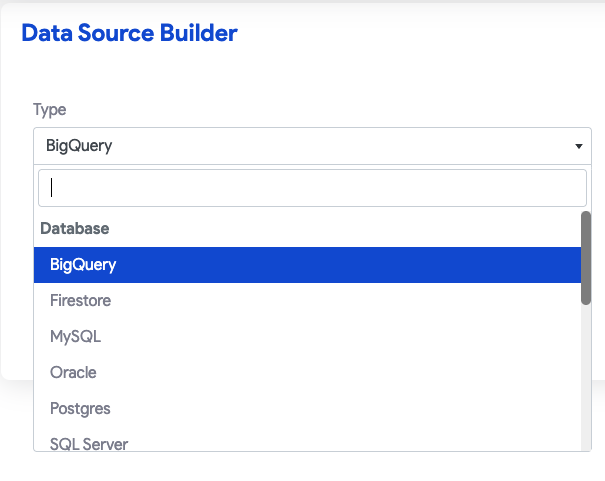
When configuring a new Data Source, you can select from several relational and document-based types in the Data Source Builder dropdown menu:
| Database Type | Description |
|---|---|
| MySQL | The world’s most popular open-source relational database. |
| Postgres | A powerful, open-source object-relational database system. |
| SQL Server | Microsoft’s enterprise-grade relational database management system. |
| Oracle | A multi-model database management system commonly used for large-scale enterprise deployments. |
| MongoDB | A NoSQL database and document store used for flexible data structures. |
| BigQuery | Google Cloud Platform’s large-scale data warehousing platform. |
Connection Configuration
Each database type requires specific configuration fields to establish a secure connection. Before saving, always use the Test Connection button to verify your credentials and network access.
MySQL & SQL-Based Configuration
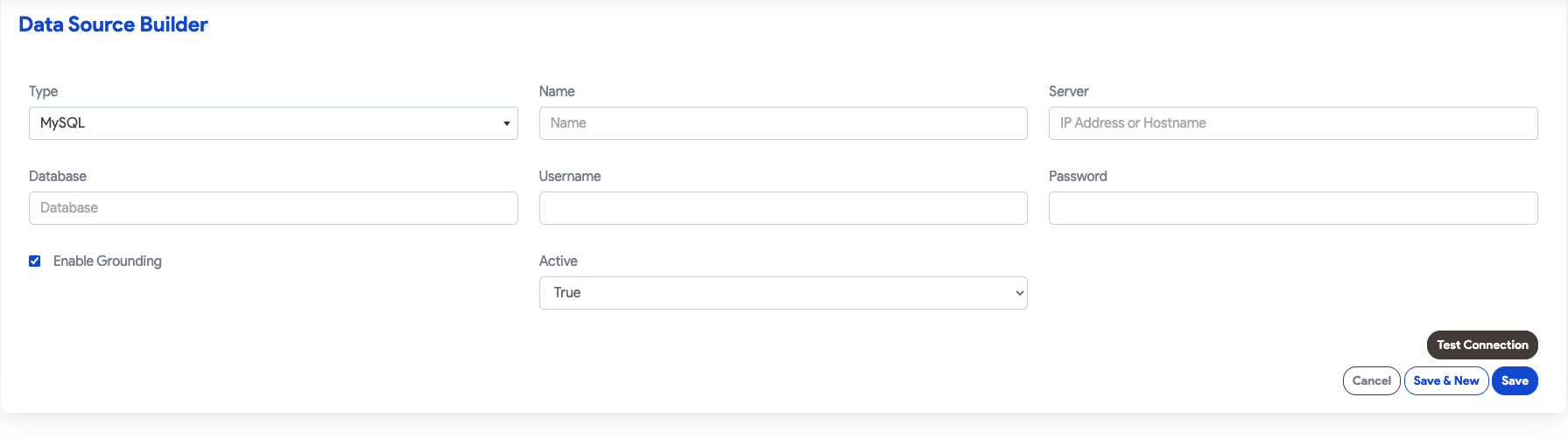
To connect a standard relational database like MySQL, you must provide the network location and authentication details:
- Server: The IP address or hostname of your database server.
- Database: The specific schema name SnapApp should access.
- Username & Password: Authentication credentials for the database user.
Enable Grounding: This specialized toggle prepares your MySQL data to be used as a reliable reference for Artificial Intelligence and Large Language Models (LLMs). Grounding ensures that AI responses are based strictly on your database’s “Single Source of Truth.”
MongoDB Configuration
Connecting to MongoDB requires a standardized connection string:
- Connection URL: The full Mongo Connection URL (e.g.,
mongodb+srv://user:pass@cluster.mongodb.net/dbname).
BigQuery Configuration
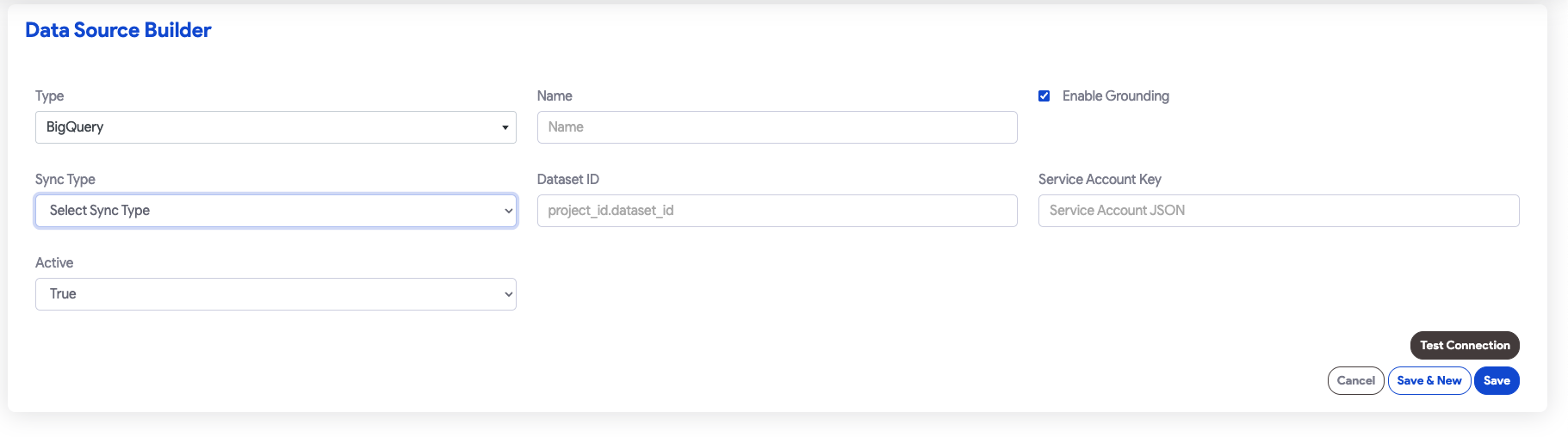
As a managed Google Cloud service, BigQuery utilizes service account keys for secure access:
- Dataset ID: The specific project and dataset identifier (format:
project_id.dataset_id). - Service Account Key: The JSON payload provided by the Google Cloud Console for your service account.
Enable Grounding: Similar to the MySQL connector, this toggle allows the SnapApp AI engine to reference your BigQuery datasets. It enables features like Natural Language Querying (e.g., asking “What were last month’s sales?”) by providing the AI with the necessary data context to generate accurate answers.
Best Practices
- Least Privilege: Ensure the database user or service account key provided has the minimum permissions necessary for the app to function.
- Connection Testing: Always use Test Connection to prevent downstream errors in your application objects.
- Active Status: Use the Active dropdown to quickly enable or disable a data source without deleting its configuration.
Support
If you have any questions or need further assistance, please reach out to our support team.
Email: snapapp@bluevector.ai


